

Configure Ghosty from your coding agent
Updated 2026-09-21
Install the ghosty-agent skill (npx skills add https://ghosty.studio) and give my Ghosty agent this identity: [write who it is]. My id and token are in GHOSTY_AGENT_ID and GHOSTY_AGENT_TOKEN.
In Ghosty Studio configuration does not live in forms: it lives in a small API over the agent's machine, and the one using it is your coding agent. Install a skill, hand it the token, and ask in plain language.
1. Copy your agent's token
In Agents → your agent → Configura a Ghosty desde tu agente de código → Generar token. The block to paste (the skill command and the two exports) appears right there. The token starts with gat_ and only reaches that agent. The id is in the URL: /app/agents/<id>.
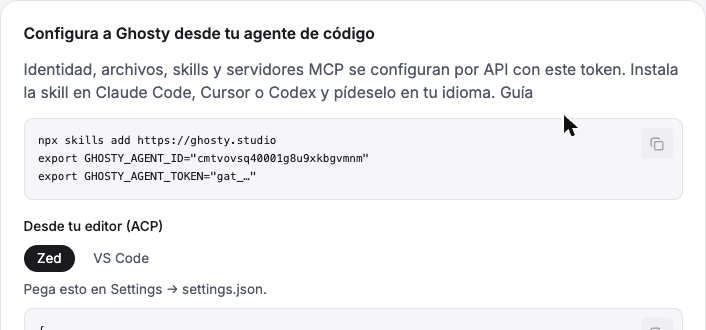
Keep both as environment variables in your terminal; never in arguments or repo files:
2. Install the skill in your coding agent
Works with Claude Code, Cursor, Codex and every agent that reads . The skill knows which endpoint to call, in what order, and what not to do (for instance, restart only once at the end).
There are four skills; the command installs the ones you pick:
The index lives at /.well-known/agent-skills/index.json with a digest per skill (v0.2.0 format), and the skills also ship inside the ghosty-acp npm package.
3. Ask for it
Open your coding agent in any folder and talk normally:
The skill ships an identity template (who it is, how it talks, what it does, what it never does, when it asks) and verifies every change with try.
What is underneath
Everything goes through https://www.ghosty.studio/api/v2/agents/<id> with Authorization: Bearer gat_…:
Every body and response is in the (tag Configuración) and in the skill's .
The community catalog
Each agent's Skills page has a From the community section: 15 open-source skills picked by real installs on skills.sh and stars verified on GitHub (grill-me, caveman, ponytail, karpathy-guidelines, brainstorming, test-driven-development, systematic-debugging, verification-before-completion, frontend-design, skill-creator, webapp-testing, web-design-guidelines, react-best-practices…). They are vendored into the repo pinned to a commit, with their license; Install turns one into the agent's own skill with all its files, and from there you edit it, turn it off per channel or delete it like any other. Through the API: GET /skills → community[] with installed, and PUT /skills/<slug> with { "fromCatalog": true }.
Good to know
- Identity and model work on every engine. Files, skills and MCP servers need an engine with its own machine (Ghosty · Lite and Goose); on Claude or DeepSeek those routes answer
409 agente_sin_maquinauntil they ship. - On engines with a machine, identity and skills load on restart (or on the next conversation). A
PATCHofpromptand aPUTof a skill are saved on the machine; the brain reads them when it boots. That is why the skill batches changes and restarts once. On Claude, Codex or DeepSeek there is no restart: the identity simply enters on the next conversation. - Files need no restart: they are on disk as soon as the
PUTfinishes. - A
PUT /mcpreplaces the whole list. To add one, send the existing list plus the new server. - The token is the agent's key: whoever has it can talk to it and use its terminal. If it leaks, rotate it from the agent card; the old one dies instantly.
- The machine may be asleep: the first call wakes it and takes a few seconds.